Opera mini v5.0 beta(latest release)
38 replies
476 views


 #1
#1 Opera Mini 5 Beta
opera mini 5
Finally after much hype and tease about the next generation in browsing, here it is Opera Mini 5 beta officially released for testing.
Some key features:
* New, sleek design
* Tabbed browsing
* Password manager
* Inline text editing
* Copy-and-paste function
* No Android version yet,
* All Palm devices will have to stick with 4.2 , as they aren't capable of running 5
* Downloads, feeds and Opera Link are all disabled in the Beta while we polish the implementation
* MUST READ IT BEFORE DOWNLOADING
* Devices with little memory may have problems, in general, and some may not be able to run Opera Mini 5 at all.
* Devices with small resolution (less than QVGA, 240 320) are not recommended to try the beta.
#2 * Top new feature
->
 Tabbed browsing
Browse several Web sites at the same time. Jump easily from one to another.
Tabbed browsing
Browse several Web sites at the same time. Jump easily from one to another.
 * Speed dial
Your favorite sites are just one click away.
* Speed dial
Your favorite sites are just one click away.
 * Touch & Keypad
The interface optimizes the display for both touchscreen and keypad phones.
* Touch & Keypad
The interface optimizes the display for both touchscreen and keypad phones.
 * password manager
Log on to your e-mail, social network and other sites with just one click.
* password manager
Log on to your e-mail, social network and other sites with just one click.

Tabbed browsing
Browse several Web sites at the same time. Jump easily from one to another.
* Speed dial
Your favorite sites are just one click away.
* Touch & Keypad
The interface optimizes the display for both touchscreen and keypad phones.
* password manager
Log on to your e-mail, social network and other sites with just one click.
#3 popular features
* Innovative and Easy-to-use
Living up to our vision of providing the best Internet experience on any device, Opera Mini 5 boasts a powerful new user interface. Merging the best from our desktop browser together with new innovations for mobile phones, Opera Mini is advanced, yet highly intuitive to use.
* Tabs
With tabbed browsing, you no longer need to interrupt one session to start another. Use your Web mail in one window, Facebook in another, Twitter in a third and all that while checking the latest sports results. With Opera Mini, you can easily identify the different tabs and jump between them.

#4 * password manager
No more hassle with those hard- to-enter usernames and passwords. Opera Mini 5 will remember your credentials, and you can log on to your favorite Web sites with just a single click. The passwords are stored on your phone for your convenience.
* Full Web in your palm
When visiting a Web page, Opera Mini displays the overview of the page and suggests where to begin your reading before you zoom in. Opera Mini also detects when on a Web page designed for a mobile phone and displays it optimally.
* Touch & Keypad
The user interface has been designed for both touchscreen- and keypad-style mobile phones. With a touchscreen, you can enjoy even easier navigation with our new zooming and kinetic scrolling.
#5 * Speed Dial
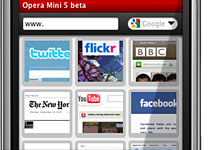
Get your favorite Web page with just one click. Speed Dial is a set of visual bookmarks you see when you open a new tab, like a dashboard for your on-line life. To add a new page, simply click on an empty Speed Dial slot, and Opera will make suggestions based on your browsing history and bookmarks.
* Built for speed
Time is precious. Opera Mini compresses pages by up to 90% before being sent to your phone, meaning faster page-load times than in other mobile Web browsers.
* Find things faster
The new Opera Mini lets you search for text within a Web page, so you can get to the information you need even more quickly than before.
* power scrolling
Scroll at warp speed using your phone keypad or by dragging the page on a phone with a touchscreen.

#6 Dont forget to comment. 
 #7
#7 thnx bro but it doesnt work on my phone...
 #8
#8 cant instal it either
#9 KiNg_oF_D_SeA: thnx bro but it doesnt work on my phone...
resolution of phone must be 240*320. If less than this then it wont be work.
#10 MzSpud: cant instal it either
plz read the 2nd post of 1st page.
#11 ShAhZaDA: resolution of phone must be 240*320. If less than this then it wont be work.
hmmm isnt there any version for res 176/220???  #12
#12 Thanks bro! Iv just complete my download of it. Its cool 
#13 KiNg_oF_D_SeA: hmmm isnt there any version for res 176/220???
yeah there is opera mini v4.2 which will work on your phone.  #14
#14 Will it work for nok n73
 #15
#15 Ya realy i like soft and procesing its very fast thanks
 #16
#16 Vishulove43: Will it work for nok n73
it shld work for nokia n73
#17 Vishulove43: Will it work for nok n73
it is .jar version and will work on every phone which supports .jar files.
It works better on n73.
#18 yup its working nw me using tat its superb thanx 
 #19
#19 Fast opera than 4.2 version
 #20
#20 it is very fine bro gud job thnx very much