*How to make cursor arrows bigger in Windows 7?

How to make cursor arrows bigger in Windows 7?
From: http://www.askdavetaylor.com/
Is there a way to make the cursor bigger in Windows 7 system? Of course there's a solution. Microsoft's got your back, nothing to worry about.
Right-click on the Desktop. Anywhere'll do. You'll see a menu like this:
 Click on "Personalize", the last choice of the set shown. Now you'll go to a big window with many different options, one well worth exploring:
 Look on the top left of the window. You'll see these options:
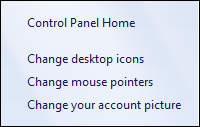 Click on "Change mouse pointers" and you'll move to a rather more complicated and information-dense window:

Click on "Personalize", the last choice of the set shown. Now you'll go to a big window with many different options, one well worth exploring:
Look on the top left of the window. You'll see these options:
Click on "Change mouse pointers" and you'll move to a rather more complicated and information-dense window:
5 replies
As you can see, you can change individual cursors if you particularly dislike one, but instead, click on the pull-down menu under "Scheme". You can see, mine currently says "Windows Aero (system scheme)". Clicking on it reveals a lot of options:
 It's a bit hard to read (ironically) but in addition to the standard Aero scheme, there's also "Windows Aero (large)" and "Windows Aero (extra large)". Choose the extra large scheme, click "Apply" on the lower right of the window, and look how much bigger the cursor just got:
 Easy enough, and it'll remember across restarts so you should be good to go. Decide it's too big? Try just "large" as a compromise.
Tip: there are also third-party fun cursor apps you can download. Avoid them all. Every single one of them. Why? Because it's a very common transmission vector for viruses and spyware.
Easy enough, and it'll remember across restarts so you should be good to go. Decide it's too big? Try just "large" as a compromise.
Tip: there are also third-party fun cursor apps you can download. Avoid them all. Every single one of them. Why? Because it's a very common transmission vector for viruses and spyware.
It's a bit hard to read (ironically) but in addition to the standard Aero scheme, there's also "Windows Aero (large)" and "Windows Aero (extra large)". Choose the extra large scheme, click "Apply" on the lower right of the window, and look how much bigger the cursor just got:
Easy enough, and it'll remember across restarts so you should be good to go. Decide it's too big? Try just "large" as a compromise.
Tip: there are also third-party fun cursor apps you can download. Avoid them all. Every single one of them. Why? Because it's a very common transmission vector for viruses and spyware.
I have already tried that, customisation on WIN 7 is very good and different as well 

 ..
..
bro me also post  1. Right-click on the desktop
and select "Personalize" from
the pop-up menu.
2. Click on "Change mouse
pointers" in the left-hand
column.
3. Click on the one you want
to change ("Normal Select"
for the default one) to
highlight it.
4. Click on the "Browse"
button.
5. Click on the new pointer
(try "aero_arrow_xl" for the
normal pointer).
6. Click the "Open" button.
7. Repeat for any other
pointers you wish to change.
8. Finally, click "OK" and then
close all the dialogs.
1. Right-click on the desktop
and select "Personalize" from
the pop-up menu.
2. Click on "Change mouse
pointers" in the left-hand
column.
3. Click on the one you want
to change ("Normal Select"
for the default one) to
highlight it.
4. Click on the "Browse"
button.
5. Click on the new pointer
(try "aero_arrow_xl" for the
normal pointer).
6. Click the "Open" button.
7. Repeat for any other
pointers you wish to change.
8. Finally, click "OK" and then
close all the dialogs.
1. Right-click on the desktop
and select "Personalize" from
the pop-up menu.
2. Click on "Change mouse
pointers" in the left-hand
column.
3. Click on the one you want
to change ("Normal Select"
for the default one) to
highlight it.
4. Click on the "Browse"
button.
5. Click on the new pointer
(try "aero_arrow_xl" for the
normal pointer).
6. Click the "Open" button.
7. Repeat for any other
pointers you wish to change.
8. Finally, click "OK" and then
close all the dialogs.
