Video Conversion-Tutorial

Here u will learn to convert large video files to relatively smaller mkv format
e.g. u can convert 1.5G.B. movie to mkv format with half sized
13 replies
Well, there's 9 sections in this tut. They are :
Section 1 : The Tools
Section 2 : Rip the DVD
Section 3 : Process the ripped files and extract the audio
Section 4 : Convert the extracted AC3 audio to WAV
Section 5 : Normalise the audio and downsample to 44.1kHz
Section 6 : Convert the audio to AAC
Section 7 : Crop and resize the video and approximate the bitrate
Section 8 : Set the video compression options and encode the video
Section 9 : Mux the video and audio
Note : we need at least 15 GB to do.
Section 1 : The Tools
1. DVDDecrypter
Code:
http://rapidshare.com/files/90666567/SetupDVDDecrypter_3.5.4.0.exe
or
http://www.free-codecs.com/download/DVD_Decrypter.htm
2. MEGui
Code:
http://rapidshare.com/files/90667640/megui-0.2.6.1041.exe
or
http://sourceforge.net/project/showfiles.php?group_id=156112&package_id=174059
3. Gordian Knot
Code:
http://rapidshare.com/files/90667336/GordianKnot.RipPack.0.35.0.Setup.2.exe
or
http://sourceforge.net/project/showfiles.php?group_id=77391&package_id=78323
4. Nero AAC Encoder
Code:
http://rapidshare.com/files/90670769/neroAacEnc.exe
or
http://www.nero.com/ena/technologies-nerodigital.html
5. Ciler's AC3 Tool
Code:
http://rapidshare.com/files/90669629/ac3tool10.exe
6. Sony Soundforge
Code:
please search in apps , I'll update later. My connection is so slow.
Section 2 : Rip the DVD
+ Star DVD decrypter
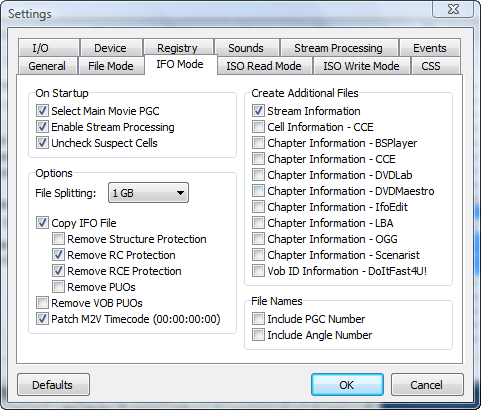
+ Click Tool/Setting/ IFO mode
+ Choose like this
 + Click OK
+ Back to the main window, choose Edit / Select Main Movies
( Change the destination if you want )
+ Click OK
+ Back to the main window, choose Edit / Select Main Movies
( Change the destination if you want )
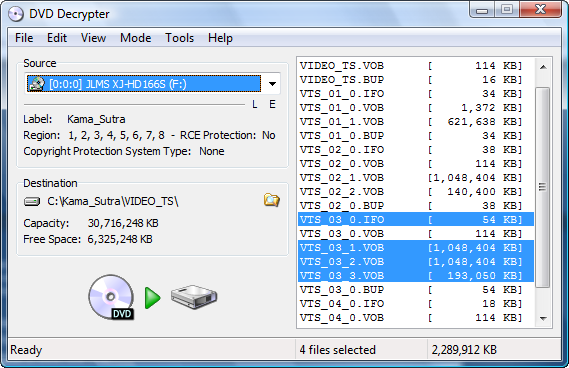 + Click Start
+ Click OK
+ Back to the main window, choose Edit / Select Main Movies
( Change the destination if you want )
+ Click Start Section 2 : Processing the ripped files and extracting the audio
+ Start Gordian Knot
+ Choose Ripping tab, then choose Prepare the VOBs, like this
 + DGIndex will start, Go to File / Open / Browse to your project directory / choose all of files , like
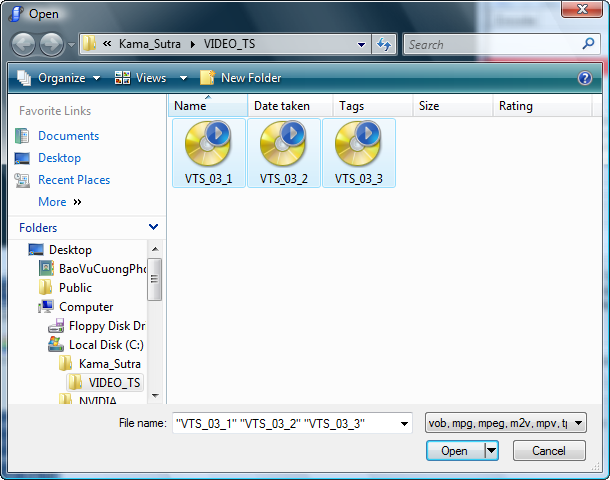 + Click Open
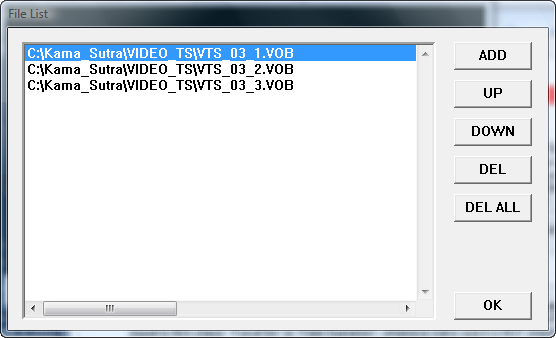
+ On this new window, you choose the first VOB file, like :
+ Click Open
+ On this new window, you choose the first VOB file, like :
 + Then click OK
+ New window appear, hit F5, you 'll see :
+ Then click OK
+ New window appear, hit F5, you 'll see :
 + Go to the Video menu and choose
- YUV / RGB / PC Scale
- iDCT Algorithm - IEEE-1180 Reference
+ Finally, go to the File menu / Save Project
+ Go to the Video menu and choose
- YUV / RGB / PC Scale
- iDCT Algorithm - IEEE-1180 Reference
+ Finally, go to the File menu / Save Project
+ DGIndex will start, Go to File / Open / Browse to your project directory / choose all of files , like
+ Click Open
+ On this new window, you choose the first VOB file, like :
+ Then click OK
+ New window appear, hit F5, you 'll see :
+ Go to the Video menu and choose
- YUV / RGB / PC Scale
- iDCT Algorithm - IEEE-1180 Reference
+ Finally, go to the File menu / Save Project Section 3 : Converting The AC3 audio to WAV format
+ Start Ciler's AC3 Tool
+ Browse to select the AC3 file that was extracted in the previous step, like :
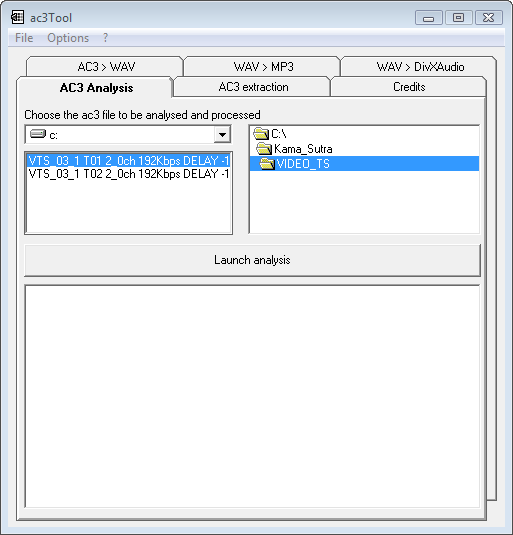 + Then click the Launch Analysis button
(A dos windows appear, just wait for a few minutes till it done)
+ Click the AC3 > WAV tab , choose like this
+ Then click the Launch Analysis button
(A dos windows appear, just wait for a few minutes till it done)
+ Click the AC3 > WAV tab , choose like this
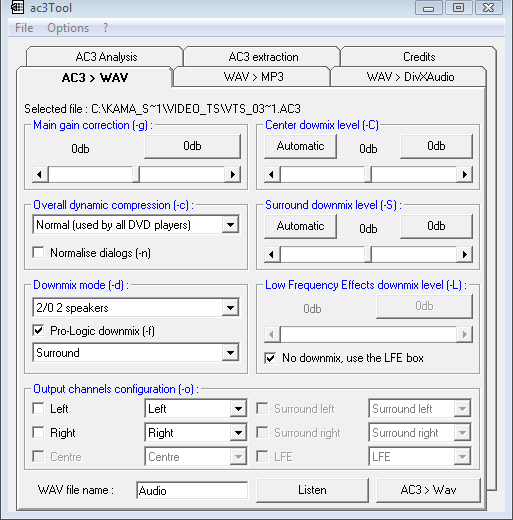 + Click the AC3 > WAV, close Ciler's AC3 tool when it done.
+ Then click the Launch Analysis button
(A dos windows appear, just wait for a few minutes till it done)
+ Click the AC3 > WAV tab , choose like this
+ Click the AC3 > WAV, close Ciler's AC3 tool when it done. Section 4 : Normalise the audio and downsample to 44.1kHz
+ Start Sound Forge
+ Open the WAV file you created in the previous step
+ Go to the Process / Normalize, choose like this :
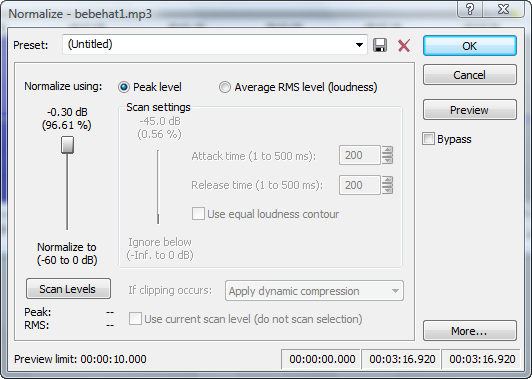 + Click OK
When it's done, go to the Process menu / Resample
+ Click OK
When it's done, go to the Process menu / Resample
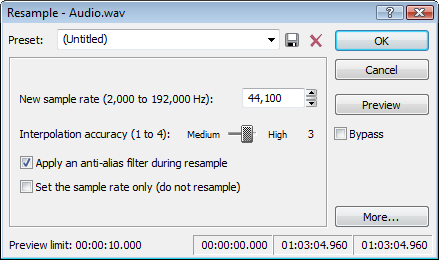 + Click OK
+ Finally, go to File menua, choose Save
+ Click OK
+ Finally, go to File menua, choose Save
+ Click OK
When it's done, go to the Process menu / Resample
+ Click OK
+ Finally, go to File menua, choose Save Section 5 : Convert the audio to AAC
+ Start MEGui
+ In audio tab, browse to the wav file in the previous step, then choose like :
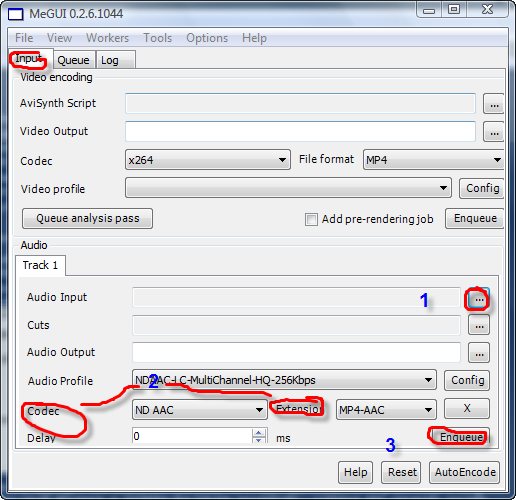 + Then click Enqueue
+ Go to the Queue tab,
+ Then click Enqueue
+ Go to the Queue tab,
 + Click Start. Wait till it's done.
+ Then click Enqueue
+ Go to the Queue tab,
+ Click Start. Wait till it's done.Section 6 : Crop and resize the video and approximate the bitrate
+ Back to Gordian Knot
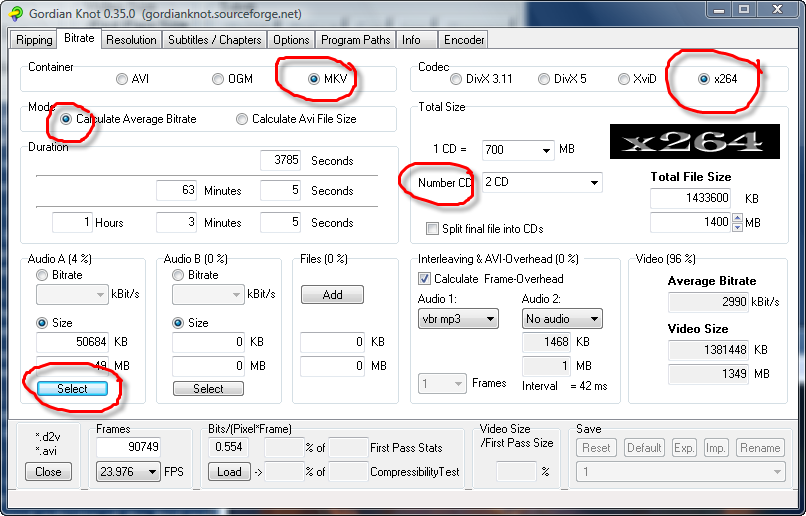
+ Select the Bitrate tab, browse to and open the D2V file you created when you processed the rip and extracted the audio, then choose like this :
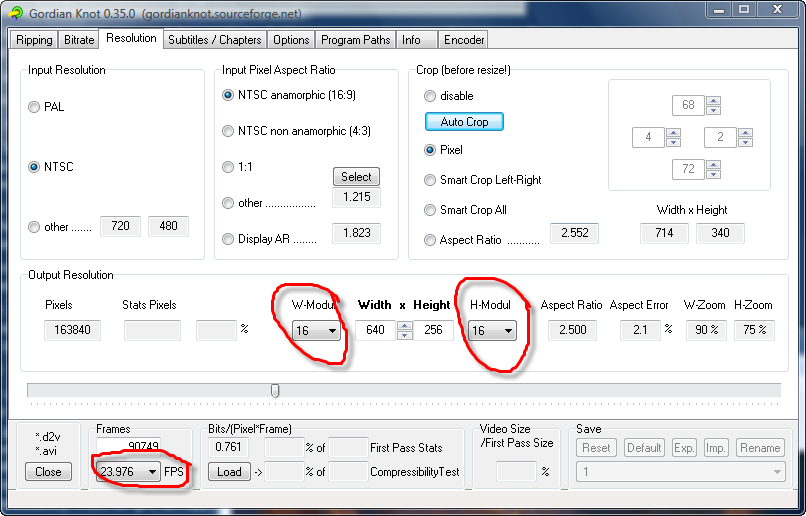
 + Select the Resolution tab, choose like this :
 + Choose save and encode in the preview window
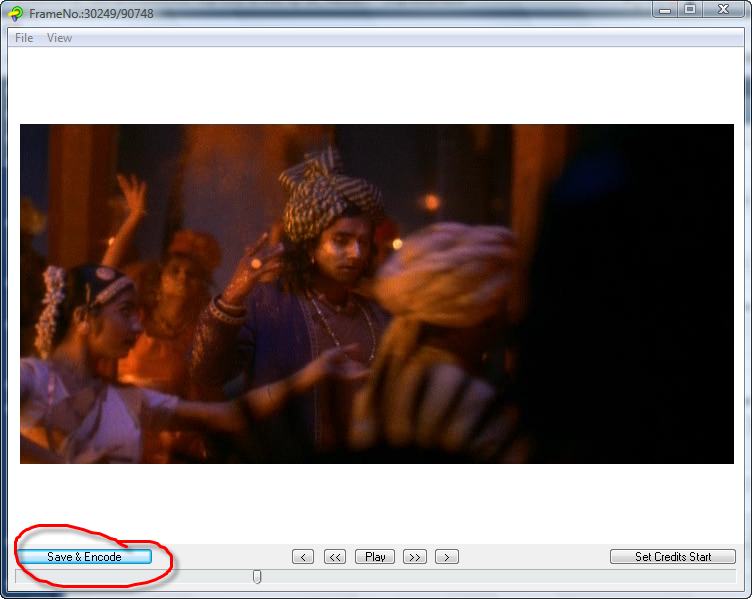 + A new window appear, click Save button
 + Back to MEGui
+ Select the Resolution tab, choose like this :
+ Choose save and encode in the preview window
+ A new window appear, click Save button
+ Back to MEGui
Section 8 : Set the video compression options and encode the video
+ On the Input tab, browse to the file you just saved, then choose like
 + Go to Tools / Bitrate Calculator , choose like :
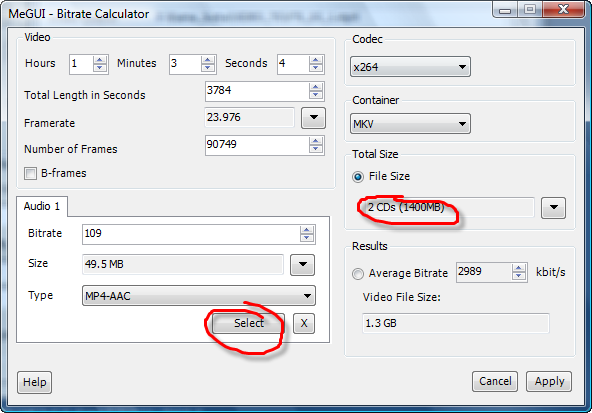 + Click Apply
+ Back to the main MEGui window, click the Enqueue button in the Video area
+ Switch to the Queue tab
+ Click the Start button
+ Click Apply
+ Back to the main MEGui window, click the Enqueue button in the Video area
+ Switch to the Queue tab
+ Click the Start button
+ Go to Tools / Bitrate Calculator , choose like :
+ Click Apply
+ Back to the main MEGui window, click the Enqueue button in the Video area
+ Switch to the Queue tab
+ Click the Start button Section 9 : Mux the video and audio
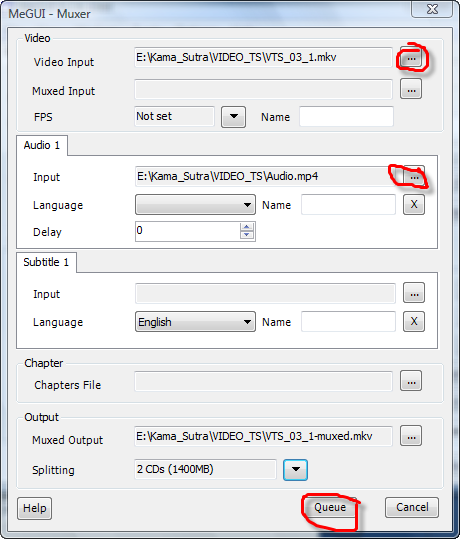
+ Back to MEGui go to Tools / Muxer / MKV Muxer, browse to all the audio and video file in that you created, just like :
 You now have a high-quality standards-compliant H.264/AVC/AAC/MP4 video made by yourself.
You now have a high-quality standards-compliant H.264/AVC/AAC/MP4 video made by yourself.
THANK U VERY MUCH FRND

 Too many tools, Alex ^o^ is there 1 tool to do it all?
nice

